

A fast dmarc lookup helps you verify whether your domain is protected against spoofing, phishing, and unauthorized email. By checking the published dmarc record in the Domain Name System, a dmarc checker confirms whether your domain has the right email authentication policy in place and whether receiving mail servers can interpret it correctly.
What a DMARC Lookup Is and Why It Matters
A dmarc lookup is a DNS-based query that retrieves your domain’s DMARC TXT Record from the _dmarc subdomain. For example, a lookup for example.com checks _dmarc.example.com for a valid dns txt record. This process is often called a dmarc record lookup, dmarc record check, or dmarc validation.
DMARC stands for Domain-based Message Authentication, Reporting and Conformance. Defined in RFC 7489, DMARC builds on SPF and DKIM to help mailbox providers determine whether a message claiming to be from your domain name is legitimate.
Why DMARC Is Critical for Email Security
Without a valid dmarc record, attackers can send unauthorized email using your Brand’s domain in the visible “From” address. This can damage trust, harm email deliverability, and expose customers to fraud. A dmarc check tool gives security teams a quick way to confirm whether their domain authentication controls are working.
For Enterprise teams, MSPs, and any Email Service Provider managing multiple domains, regular dmarc record check workflows are essential for email security, phishing protection, spoofing prevention, and long-term brand protection.
What a DMARC Checker Looks For
A reliable dmarc checker or DMARC Record Checker typically verifies:
- Whether a dmarc record exists
- Whether the dmarc syntax is valid
- Whether the dmarc version begins with v=DMARC1
- Whether the dmarc policy is set to none, quarantine, or reject
- Whether reporting destinations are valid
- Whether the record contains a dangerous misconfiguration
Tools such as EasyDMARC, Mxtoolbox, and dmarcian provide a dmarc diagnostic tool, dmarc record lookup, and record testing interface that make these checks easier to interpret.
How DMARC Works with SPF and DKIM to Stop Email Spoofing
DMARC does not work alone. It relies on SPF and DKIM to support strong email authentication across the modern email ecosystem.
SPF and DKIM as the Foundation
SPF, or Sender Policy Framework, checks whether the sending mail server is authorized to send mail for a domain. DKIM, or DomainKeys Identified Mail, verifies that a message has not been altered by checking a cryptographic DKIM signature.
DMARC then evaluates whether SPF or DKIM passes and whether the authenticated domain aligns with the visible Header From domain. This relationship is known as dmarc alignment.
Message Validation and Disposition
During message validation, receiving ISPs such as Google and Yahoo examine the sender’s SPF, DKIM, and DMARC results. If the message fails authentication or alignment, the receiver applies the domain’s dmarc policy.
None, Quarantine, and Reject
A DMARC policy can instruct receivers to:
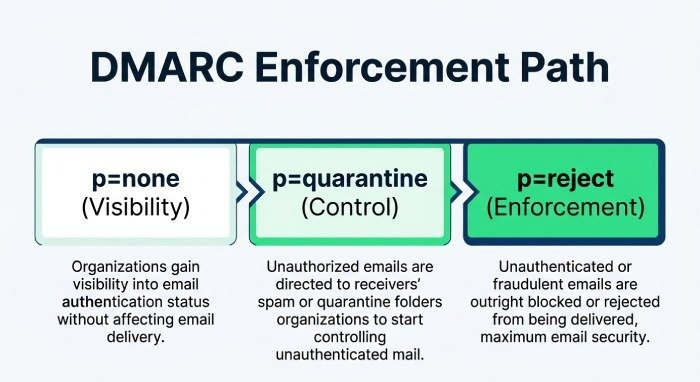
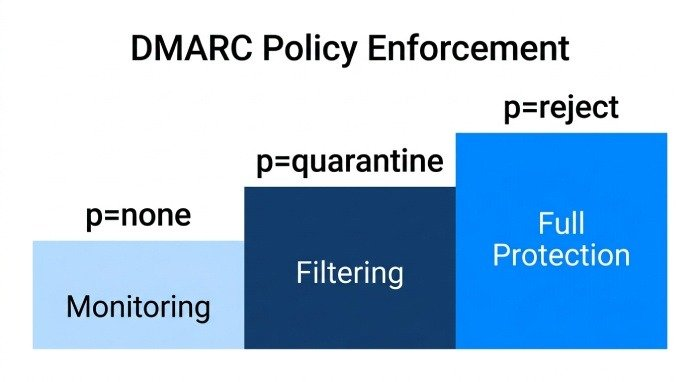
- p=none: Monitor only and send dmarc reports
- p=quarantine: Treat failing messages suspiciously, often sending them to spam under a quarantine policy
- p=reject: Block failing messages using a reject policy
This message disposition gives domain owners control over how suspicious mail is handled and supports progressive dmarc enforcement.
How to Run an Instant DMARC Lookup for Your Domain
Running an instant dmarc lookup online is simple, but interpreting the results requires care. A good dmarc check tool should reveal not only whether the record exists, but also whether it is safe, compliant, and aligned with your sending infrastructure.
Step-by-Step DMARC Record Lookup
To perform a dmarc record lookup:
- Enter your domain into a dmarc checker such as EasyDMARC, Mxtoolbox, or dmarcian.
- The tool queries the Domain Name System for _dmarc.yourdomain.com.
- It retrieves the published TXT Record.
- The dmarc diagnostic tool reviews the tags, policy, reporting fields, and syntax.
- The dmarc validation result shows whether the record is correct or needs changes.
A typical dmarc record looks like this:
v=DMARC1; p=quarantine; rua=mailto:*dmarc*-aggregate@example.com; ruf=mailto:*dmarc*-forensic@example.com; pct=100
In this example, the p= value defines the dmarc policy, while the rua tag and ruf tag identify where reports should be sent.
Using a DMARC Record Wizard
A DMARC Record Wizard can help create a valid record if your domain has no DMARC configuration. Many tools include a tag explanation feature to clarify what each dmarc tag does, including p, sp, rua, ruf, pct, fo, and ri.
Public Tools and Privacy
When using a public dmarc check tool, review its Public Tools Policy, especially if you are checking sensitive Enterprise or MSP-managed domains. Public lookup tools usually perform passive DNS checks, but uploaded report data may be handled differently depending on the provider.
Understanding DMARC Record Results, Policies, and Common Errors
A dmarc record check should return a clear result: valid, missing, warning, or error. However, a “valid” result does not always mean your domain is fully protected. A record can pass dmarc validation while still using a weak dmarc policy.
Core DMARC Tags to Review
The most important dmarc record elements include:
- v=DMARC1: The required dmarc version
- p=: The primary dmarc policy
- sp=: The subdomain policy
- rua=: The Reporting URI for the aggregate report
- ruf=: Destination for a forensic report
- pct=: The policy distribution percentage
- ri=: The requested reporting interval
POLICY_DOMAIN and Reporting Format
Some tools may reference POLICY_DOMAIN when showing the organizational domain evaluated during a dmarc record lookup. Reporting data may arrive in XML for aggregate reporting, while forensic reports may use formats such as afrf or iodef, depending on provider support and the specified reporting format.
Common DMARC Misconfigurations
A dmarc diagnostic tool commonly flags these issues:
Missing or Duplicate Records
DMARC allows only one valid dmarc record per domain. Multiple records can cause failure because receivers cannot determine the correct dmarc policy.
Invalid Reporting Addresses
If the rua or ruf mailboxes are incorrect, you may not receive dmarc reports. External reporting destinations may also require verification before ISPs will send data.
Weak Monitoring-Only Policy
A domain with p=none can collect data, but it does not enforce protection. Moving toward quarantine and then reject policy is usually necessary for meaningful dmarc compliance.
Reading DMARC Inspector Results
A DMARC Inspector or dmarc checker may show SPF alignment, DKIM alignment, policy status, and DNS health. These results help determine whether your dns configuration supports the current email sender requirements from major providers such as Google and Yahoo.
Best Practices for Strengthening Your Domain’s Email Protection
A single dmarc lookup is useful, but ongoing monitoring is what turns DMARC into a mature control. Organizations should combine regular dmarc record check routines with report analysis, sender inventory, and policy enforcement.
Start with Visibility, Then Enforce
Begin with p=none to collect dmarc reports and identify every legitimate Email Service Provider sending on your behalf. After confirming SPF, DKIM, and dmarc alignment, move to p=quarantine, then eventually to p=reject.
This gradual path improves dmarc enforcement without disrupting legitimate mail flow.
Monitor Reports and Maintain Authentication
Use an automated platform such as EasyDMARC, dmarcian, or another dmarc diagnostic tool to review aggregate report trends. A recurring dmarc record lookup can catch DNS changes, expired vendors, and accidental changes to the dmarc record.
Operational Best Practices
Strong DMARC operations should include:
- Running a dmarc checker after every DNS change
- Performing monthly dmarc validation across primary and parked domains
- Confirming SPF and DKIM are configured for every sender
- Using a dmarc check tool to verify policy changes before publishing
- Reviewing dmarc record check results after onboarding new platforms
- Keeping the DMARC, SPF, and DKIM records documented for audit readiness
Align DMARC with Business Risk
Not every domain sends mail. Parked or defensive domains should often use a strict dmarc policy such as p=reject to prevent abuse. Active sending domains may need a staged rollout, but the goal should be the same: trusted email authentication, reliable email deliverability, and reduced exposure to impersonation across the global email ecosystem.